Sound and picture engineered in, not bolted on.
From a dedicated home cinema to whole-home audio to a commercial conference room, Agrima designs the acoustics and cable routing before installation — then wires it into the same control system as everything else.
Residential and commercial AV.
Home cinema
Dedicated theater rooms with acoustic treatment, calibrated sound, and one remote for everything.
Multi-room audio
Background music that follows you through the house — and out to the terrace, balcony, or garden — different zones, different sources, one app.
Commercial AV
Conference rooms, auditoriums, and event spaces — reliable one-touch video conferencing and presentation systems.
5.1, 7.2, 7.2.4 — what the numbers mean.
Every surround layout is written as three numbers. The first is the speakers around you at ear level. The second is the subwoofers, for deep bass. The third, when there is one, is the speakers in the ceiling, for Dolby Atmos and DTS:X sound from above. Tap a layout to see where each speaker goes.
7.2.4
- Screen
- Ear-level speaker
- Subwoofer
- Ceiling (height) speaker
Every layout at a glance.
| Layout | Ear level | Subwoofers | Ceiling | Best for |
|---|---|---|---|---|
| 5.1 | 5 | 1 | – | Living rooms and smaller media rooms |
| 5.2 | 5 | 2 | – | Living rooms where the bass should be even across a long sofa |
| 5.1.2 | 5 | 1 | 2 | Dolby Atmos in a room with no space behind the seats |
| 5.2.2 | 5 | 2 | 2 | Dolby Atmos media rooms, even bass |
| 7.1 | 7 | 1 | – | Media rooms with space behind the sofa |
| 7.2 | 7 | 2 | – | Dedicated media rooms |
| 7.1.2 | 7 | 1 | 2 | Media rooms and cinemas adding Dolby Atmos |
| 7.2.2 | 7 | 2 | 2 | Home cinemas, Dolby Atmos with even bass |
| 7.2.4 | 7 | 2 | 4 | Dedicated home cinemas — sound moves overhead front to back |
How we place each speaker — Dolby Atmos guidelines
- Front left and right sit about 22–30° either side of the screen's centre line, with the centre straight ahead, so dialogue stays on the screen.
- Side surrounds sit at 90–110°, beside your shoulders. In a 5-speaker layout they move slightly behind you, to 110–120°.
- Rear surrounds (the 7 in 7.1) sit behind the seats at 135–150°.
- Every ear-level speaker is at about 1.2 m, seated ear height, and the same distance from the main seat. Where the room does not allow that, we time-align them electronically.
- Ceiling speakers line up with the front left and right. In a .4 layout the front pair is about 45° up and ahead of you (30–55°) and the rear pair mirrors it behind; in a .2 layout one pair sits just in front of the seats. The arrangement is centred over the seating, not over the screen.
- Ceiling speakers with a wide spread can fire straight down; narrower ones should be angled towards the seats — which is where angled in-ceiling speakers earn their place.
- Where the ceiling can't take speakers, Dolby Atmos enabled (upward-firing) speakers bounce height sound off the ceiling instead.
Source: Dolby, Dolby Atmos Home Theater Installation Guidelines. We then adjust for your room's shape, doors, windows and seating.
Which layout suits your room?
A general guide. We measure the room, the ceiling height and where the seats go, and design the layout around them — including layouts beyond 7.2.4 for larger rooms.
How big should the screen be?
The right size depends on how far you sit. Too small and the picture feels like a window across the room; too big and your eyes chase the action from corner to corner. Move the slider to the distance from your seat to the screen.
75″–100″
Based on the horizontal viewing angle: about 40° for an immersive cinema (THX's recommendation for the best seat) down to about 30° for relaxed everyday viewing. Width = 2 × distance × tan(angle ÷ 2), for a 16:9 screen. A guide, not a rule — we confirm the size against your seating, room and projector or TV choice.
Screen sizes and the seating distance each one suits (16:9, viewing angle 40° to 30°).
| Screen | Picture size | Seat distance | Usually |
|---|---|---|---|
| 55″ | 122 × 68 cm | 1.7–2.3 m5.5–7.5 ft | TV |
| 65″ | 144 × 81 cm | 2.0–2.7 m6.5–8.8 ft | TV |
| 75″ | 166 × 93 cm | 2.3–3.1 m7.5–10.2 ft | TV |
| 85″ | 188 × 106 cm | 2.6–3.5 m8.5–11.5 ft | TV |
| 98″ | 217 × 122 cm | 3.0–4.0 m9.8–13.3 ft | TV |
| 110″ | 244 × 137 cm | 3.3–4.5 m11.0–14.9 ft | TV or projector |
| 120″ | 266 × 149 cm | 3.6–5.0 m12.0–16.3 ft | TV or projector |
| 133″ | 294 × 166 cm | 4.0–5.5 m13.3–18.0 ft | Projector |
| 150″ | 332 × 187 cm | 4.6–6.2 m15.0–20.3 ft | Projector |
Seen, hidden, or somewhere in between.
The same layout can be built with speakers you see or speakers you don't. The choice depends on the room, the interior design and how the room is used. Choosing by loudness? Watts are not the number that matters: read speaker watts vs dB.
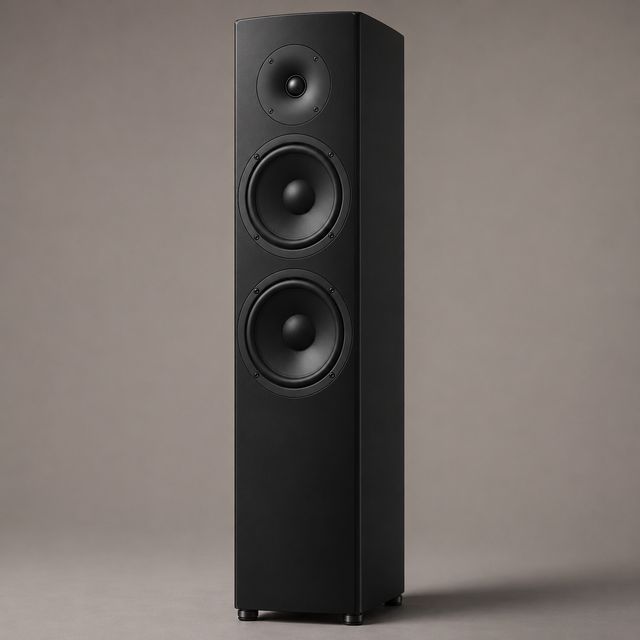
Floor-standing
A tall speaker that stands on the floor, with several drivers in one cabinet. The fullest, most room-filling sound, and a statement piece in the room.
Best for front left and right in a cinema or a music room.
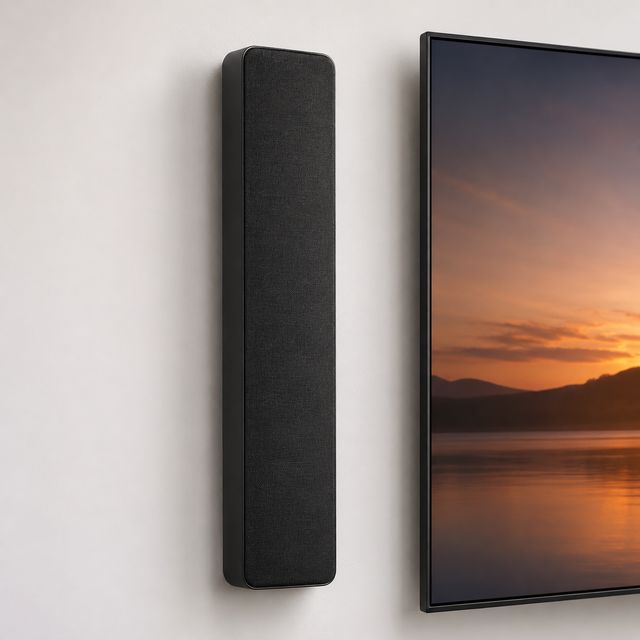
On-wall (wall-mount)
A slim speaker hung on the wall, often matched to the TV. Takes no floor space and needs no cutting into the wall.
Best for living rooms, surrounds, and homes already finished.
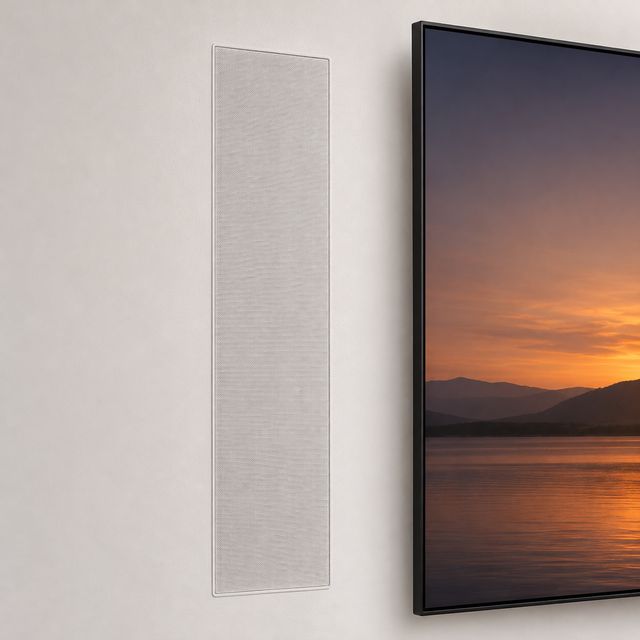
In-wall
Built into the wall so only a thin grille shows, which can be painted to match. Full cinema sound with almost nothing to see.
Best for front and surround speakers in a designed room, planned before the walls are finished.
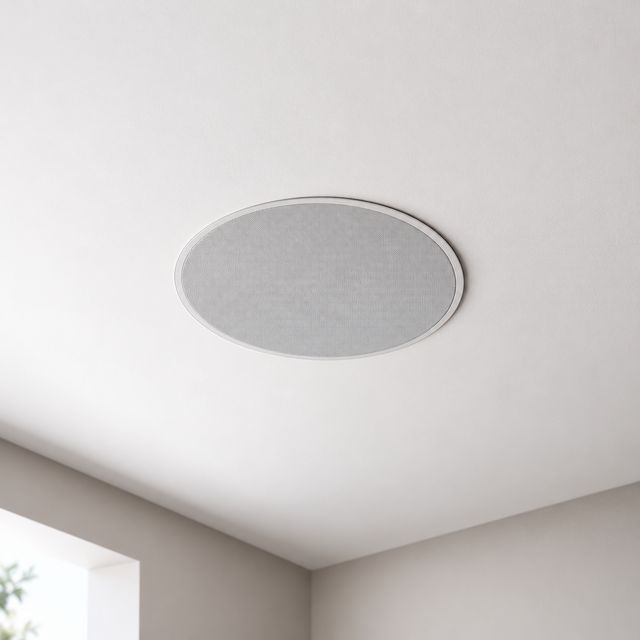
In-ceiling
A round or square speaker set flush into the ceiling, firing straight down. The usual choice for background music in every room.
Best for multi-room music, and Atmos height speakers above the seats.
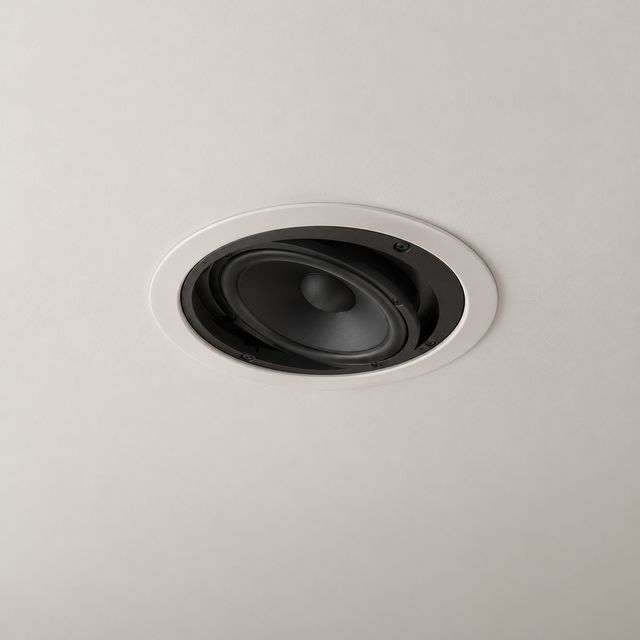
In-ceiling, angled
A ceiling speaker whose driver tilts, so the sound is aimed at the seats instead of straight down. Puts surround and height sound exactly where you sit.
Best for Atmos ceiling speakers, and surrounds where the walls can't take a speaker.
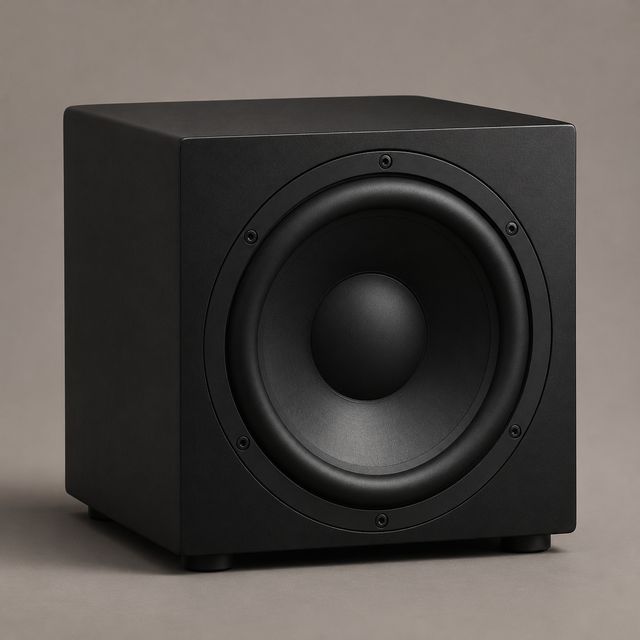
Subwoofer
A speaker only for the deepest bass: explosions, a kick drum, the rumble you feel. It can sit in a corner, inside a cabinet, or be built into the wall.
Best for every cinema, and music rooms that want real weight.
What are woofers and subwoofers for?
A woofer is the large driver inside a speaker that makes bass; the small one, the tweeter, makes the high notes. A subwoofer is a separate speaker that handles only the deepest bass, below roughly 80 Hz, which the other speakers hand over to it. Your ears can't tell where very deep bass comes from, so a subwoofer can be hidden almost anywhere.
Why two? Every room makes bass louder in some seats and weaker in others. A second subwoofer, placed well, evens that out, so the whole sofa gets the same impact. That is the ".2" in 5.2 or 7.2.4.
Different music in every room, from one system.
Multi-zone audio puts speakers in the rooms you choose — living, kitchen, bedrooms, terrace, garden — and lets each room play its own music at its own volume, or all of them play the same song together. Tap a room to change what it plays.
How it works
Each room is controlled from its wall keypad, the same app that runs the lights and AC, or by voice. On Crestron this is the DM NAX range — see our Crestron NAX guide.
Why it feels like luxury
Stream from your own phone
Play from Spotify, Amazon Music, Apple Music or any app on your phone, and send it to one room or several with AirPlay 2 or Spotify Connect. Guests can play their music too, without being handed a remote.
Every app you already use
Spotify, Amazon Music, Apple Music and internet radio run from the system itself, so the music keeps playing when your phone leaves the house.
Nothing to see
Speakers sit flush in the ceiling with paintable grilles; the amplifiers live in a rack out of sight. The music is there; the equipment isn't.
Every room its own
News in the kitchen, soft music in the bedroom, a playlist on the terrace — at the same time, each at its own volume.
One touch for the whole house
A Party button sends the same music to every zone in sync. All off silences the house as you leave.
Part of your scenes
A Dinner scene dims the lights, closes the curtains and starts the dinner playlist in the dining room — one press.
Indoors and out
Weather-rated speakers carry the music to the garden, pool and terrace, so the evening doesn't stop at the door.
Sound that stays good
Proper amplifiers and speakers chosen for each room, tuned at handover — not a smart speaker on a shelf.
Home theatre and multi-room audio, answered.
What does 7.2.4 mean?
Seven speakers around you at ear level, two subwoofers for deep bass, and four speakers in the ceiling for Dolby Atmos height effects. The first number is ear-level speakers, the second is subwoofers, and the third is ceiling speakers.
Is 5.1 enough, or do I need 7.1 or Dolby Atmos?
5.1 suits a living room or a smaller media room. 7.1 adds rear speakers behind the seats, which helps when there is space behind the sofa. Ceiling speakers (7.1.2, 7.2.4) add sound from above and make the most difference in a dedicated home cinema. We recommend a layout after seeing the room.
Do I need two subwoofers?
Not always, but it helps. A room makes bass stronger in some seats and weaker in others; a second subwoofer evens this out so every seat gets the same impact. In a cinema with more than one seat, we usually recommend two.
In-wall or in-ceiling speakers — which is better?
They do different jobs. In-wall speakers are best for the front and surround speakers of a cinema, because sound should come from ear height. In-ceiling speakers suit background music and Atmos height channels; angled in-ceiling speakers aim the sound at the seats.
What size TV or projector screen suits my viewing distance?
Measure from your seat to the screen. At about 3 m (10 ft), a 75 to 98 inch screen fills a comfortable-to-cinematic viewing angle; at about 4 m (13 ft), roughly 98 to 130 inches. Beyond roughly 100 to 120 inches a projector and screen is usually the practical choice. We confirm the size against your room and seating.
What is the difference between 5.1.2 and 7.1.2?
Both have two ceiling speakers for Dolby Atmos height sound. 5.1.2 has five speakers at ear level, suited to a room with no space behind the seats; 7.1.2 adds two rear speakers behind the seats. 5.2.2 is 5.1.2 with a second subwoofer.
Can I play Spotify or AirPlay 2 in different rooms?
Yes. With multi-zone audio you can send music from Spotify, Amazon Music, Apple Music or any app on your phone to one room or several, using AirPlay 2 or Spotify Connect, while other rooms play something else or stay quiet.
What is multi-zone audio?
One central system that plays music in several rooms, called zones. Each zone can play its own source at its own volume, or every zone can play the same music in sync. It is controlled from wall keypads, the app or voice, and the equipment sits out of sight in a rack.
Designed for the room, not just plugged in.
Acoustic planning
Speaker placement and room treatment planned before install, not guessed afterward.
Clean, cable-free installs
Wiring planned into the build so speakers, screens, and panels sit flush with no visible clutter.
One interface
Same keypad and app used for lighting and climate also runs the AV — no separate remotes.
Calibrated & supported
Systems tuned at handover and revisited if a room's use changes.
Speakers, amplifiers, and displays we specify and support.
We're authorized partners for pro and consumer audio brands including Bose Professional, Sonos, Bang & Olufsen, Marantz, Devialet, Arcam, and Danish loudspeaker specialist DALI, plus architectural and in-wall speaker specialists Origin Acoustics and Amina for rooms where visible speakers aren't an option. On the video side, we install and calibrate projection and display systems from Optoma, Epson, and JVC. Every brand we specify is on our own brands page — we don't sub-brand or relabel hardware.
For a fully dedicated screening or media room, see our Home Theatre page for acoustic design, seating, and control detail specific to that space.
Design first, then wire, then tune.
Room & acoustic design
Speaker placement, screen size and viewing distance, and room treatment planned against the room's actual dimensions — before anything is ordered.
Cabling & conduit
Speaker, HDMI, and network runs planned into the build alongside electrical and lighting, so nothing is surface-mounted or retrofitted later.
Installation & calibration
Hardware installed, then the room itself is measured and the system tuned to it — not just powered on and left at factory settings.
Integration & handover
Wired into the same Crestron control layer as lighting and climate, tested scene by scene, then handed over with a walkthrough of the app and keypads.